springboot+springSecurity+jwt实现登录认证后令牌授权(已绑定整个项目的源码)
目录
一、自定义数据源登录认证
默认情况下,spring security会生成默认用户名和密码,但是在实际开发中,我们大多数都时从数据库中获取用户密码的,所以这里需要向默认登录认证过滤器,替换为我们需要的。
1、实现spring security中UserDetails类
package cn.cdjs.entity;

import com.baomidou.mybatisplus.annotation.TableId;
import lombok.Data;
import org.springframework.security.core.GrantedAuthority;
import org.springframework.security.core.userdetails.UserDetails;

import java.util.Collection;

/**
 * @Author Jiangjinlong
 * @Date 2023/7/21 16:31
 * @PackageName:com.security.entity
 * @ClassName: User
 * @Description: TODO
 */
@Data
public class User implements UserDetails {
    @TableId
    private String username;
    private String password;
    /*
    是否启用
     */
    private Boolean enabled;
    /*
    账户是否过期
     */
    private Boolean accountNonExpired;
    /*
    账户是否锁定
     */
    private Boolean accountNonLocked;
    /*
    密码是否过期
     */
    private Boolean credentialsNonExpired;


    @Override
    public Collection<? extends GrantedAuthority> getAuthorities() {
        return null;
        //本次不设置用户权限
        //Set<SimpleGrantedAuthority> authorities = new HashSet<>();
        //roles.forEach(role -> {
        //    SimpleGrantedAuthority simpleGrantedAuthority = new SimpleGrantedAuthority(role.getName());
        //    authorities.add(simpleGrantedAuthority);
        //});
        //return authorities;

        //List<GrantedAuthority> grantedAuthorities = new ArrayList<>();
        //roles.forEach(role -> grantedAuthorities.add(new
        //        SimpleGrantedAuthority(role.getRoleName())));
        //return grantedAuthorities;
    }

    @Override
    public String getPassword() {
        return password;
    }

    public void setPassword(String password) {
        this.password = password;
    }

    @Override
    public String getUsername() {
        return username;
    }

    public void setUsername(String username) {
        this.username = username;
    }

    @Override
    public boolean isAccountNonExpired() {
        return accountNonExpired;
    }

    public void setAccountNonExpired(Boolean accountNonExpired) {
        this.accountNonExpired = accountNonExpired;
    }

    @Override
    public boolean isAccountNonLocked() {
        return accountNonLocked;
    }

    public void setAccountNonLocked(Boolean accountNonLocked) {
        this.accountNonLocked = accountNonLocked;
    }

    @Override
    public boolean isCredentialsNonExpired() {
        return credentialsNonExpired;
    }

    public void setCredentialsNonExpired(Boolean credentialsNonExpired) {
        this.credentialsNonExpired = credentialsNonExpired;
    }

    @Override
    public boolean isEnabled() {
        return enabled;
    }

    public void setEnabled(Boolean enabled) {
        this.enabled = enabled;
    }
}
2、用户查询和更新密码的mapper
package cn.cdjs.mapper;

import cn.cdjs.entity.User;
import com.baomidou.mybatisplus.core.mapper.BaseMapper;
import org.apache.ibatis.annotations.Mapper;
import org.apache.ibatis.annotations.Param;
import org.apache.ibatis.annotations.Select;
import org.apache.ibatis.annotations.Update;

/**
 * @Author Jiangjinlong
 * @Date 2023/7/21 16:44
 * @PackageName:com.security.mapper
 * @ClassName: UserDao
 * @Description: TODO
 */
@Mapper
public interface UserDao extends BaseMapper<User> {

    //根据用户名查询用户
    @Select("select username, password, enabled, accountNonExpired, accountNonLocked, credentialsNonExpired\n" +
            "        from user\n" +
            "        where username = #{username}")
    User loadUserByUsername(@Param("username") String username);
    //根据用户更名新密码密码
    @Update("update `user` set password=#{password} where username=#{username}")
    Integer updatePassword(@Param("username") String username,@Param("password") String password);
}
3、查询或更新密码的service
- loadUserByUsername:用于从数据库中查询用户是否存在;
- updatePassword:用户将数据库中明文密码,更新为密文,确保数据的安全性;
package cn.cdjs.service;

import cn.cdjs.entity.User;
import cn.cdjs.mapper.UserDao;
import org.springframework.beans.factory.annotation.Autowired;
import org.springframework.security.core.userdetails.UserDetails;
import org.springframework.security.core.userdetails.UserDetailsPasswordService;
import org.springframework.security.core.userdetails.UserDetailsService;
import org.springframework.security.core.userdetails.UsernameNotFoundException;
import org.springframework.stereotype.Service;
import org.springframework.util.ObjectUtils;

/**
 * @Author Jiangjinlong
 * @Date 2023/7/21 16:42
 * @PackageName:com.security.config
 * @ClassName: MyUserDetailService
 * @Description: 数据源的认证
 */
@Service
public class MyUserDetailService implements UserDetailsService, UserDetailsPasswordService {
    private final UserDao userDao;

    @Autowired
    public MyUserDetailService(UserDao userDao) {
        this.userDao = userDao;
    }

    @Override
    public UserDetails loadUserByUsername(String username) throws UsernameNotFoundException {
        User user = userDao.loadUserByUsername(username);
        if (ObjectUtils.isEmpty(user)) throw new UsernameNotFoundException("用户名不正确");
        return user;
    }
    @Override
    public UserDetails updatePassword(UserDetails user, String newPassword) {
        Integer result = userDao.updatePassword(user.getUsername(),newPassword);
        if (result==1) {
            ((User) user).setPassword(newPassword);
        }
        return user;
    }
}
4、自定义用户登录过滤器
由于根据spingsecurity的认证流程,发起认证请求,请求中携带⽤户名、密码,该请求会被
UsernamePasswordAuthenticationFilter 拦截,通过里面的attemptAuthentication⽅法
中将请求中⽤户名和密码,封装为Authentication对象,并交给AuthenticationManager 进⾏认证。所以这里需继承UsernamePasswordAuthenticationFilter ,并重新Authentication对象。
package cn.cdjs.config.security;

import com.fasterxml.jackson.databind.ObjectMapper;
import org.springframework.context.annotation.Configuration;
import org.springframework.security.authentication.AuthenticationServiceException;
import org.springframework.security.authentication.UsernamePasswordAuthenticationToken;
import org.springframework.security.core.Authentication;
import org.springframework.security.core.AuthenticationException;
import org.springframework.security.web.authentication.UsernamePasswordAuthenticationFilter;

import javax.servlet.http.HttpServletRequest;
import javax.servlet.http.HttpServletResponse;
import java.io.IOException;
import java.util.Map;

/**
 * @Author Jiangjinlong
 * @Date 2023/7/24 14:02
 * @PackageName:com.nohtml.config
 * @ClassName: LoginFilter
 * @Description: 自定义前后端分离认证得filter
 */
@Configuration
public class LoginFilter extends UsernamePasswordAuthenticationFilter {
    @Override
    public Authentication attemptAuthentication(HttpServletRequest request, HttpServletResponse response) throws AuthenticationException {
        //1.判断是否是post方式请求
        if (!request.getMethod().equals("POST")) {
            throw new AuthenticationServiceException("Authentication method not supported: " + request.getMethod());
        }
        //2.判断是否是json格式请求类型
        if (request.getContentType().equalsIgnoreCase("application/json")) {
            //3.从json数据中获取用户输入的用户密码进行认证
            try {
                Map<String,String> userInfo = new ObjectMapper().readValue(request.getInputStream(), Map.class);
                String username = userInfo.get(getUsernameParameter());
                String password = userInfo.get(getPasswordParameter());
                UsernamePasswordAuthenticationToken authRequest = UsernamePasswordAuthenticationToken.unauthenticated(username, password);
                this.setDetails(request, authRequest);
                return this.getAuthenticationManager().authenticate(authRequest);
            }catch (IOException e){
                e.printStackTrace();
            }
        }
        return super.attemptAuthentication(request, response);
    }
}
5、继承WebSecurityConfigurerAdapter,配置spring security
这里包含了用户登录和令牌授权的配置
- 注入登录过滤器LoginFilter
- 指定登录认证的url
- 指定登录时请求体里面的用户名和密码key
- 自定义认证成功和失败的响应体
- 重写configure
- 指定认证方式
- 自定义异常处理
- 自定义登出异常响应
- 配置全局跨域
- 将令牌暴露给前端,以便js能够获取到令牌
package cn.cdjs.config.security;

import cn.cdjs.entity.User;
import cn.cdjs.service.MyUserDetailService;
import cn.cdjs.utils.other.AjaxResult;
import com.fasterxml.jackson.databind.ObjectMapper;
import org.springframework.beans.factory.annotation.Autowired;
import org.springframework.context.annotation.Bean;
import org.springframework.context.annotation.Configuration;
import org.springframework.http.HttpStatus;
import org.springframework.security.authentication.AuthenticationManager;
import org.springframework.security.config.annotation.authentication.builders.AuthenticationManagerBuilder;
import org.springframework.security.config.annotation.web.builders.HttpSecurity;
import org.springframework.security.config.annotation.web.configuration.EnableWebSecurity;
import org.springframework.security.config.annotation.web.configuration.WebSecurityConfigurerAdapter;
import org.springframework.security.config.http.SessionCreationPolicy;
import org.springframework.security.web.authentication.UsernamePasswordAuthenticationFilter;
import org.springframework.web.cors.CorsConfiguration;
import org.springframework.web.cors.CorsConfigurationSource;
import org.springframework.web.cors.UrlBasedCorsConfigurationSource;

import java.util.Arrays;
import java.util.HashMap;

/**
 * @Author Jiangjinlong
 * @Date 2023/7/24 13:57
 * @PackageName:com.nohtml.config
 * @ClassName: SecurityConfig
 * @Description: TODO
 */
@Configuration
@EnableWebSecurity
public class SecurityConfig extends WebSecurityConfigurerAdapter{

    @Autowired
    private TokenProvider tokenProvider;

    private final MyUserDetailService myUserDetailService;

    public SecurityConfig(MyUserDetailService myUserDetailService) {
        this.myUserDetailService = myUserDetailService;
    }


    @Override
    protected void configure(AuthenticationManagerBuilder auth)throws Exception{
        auth.userDetailsService(myUserDetailService);
    }

    @Bean
    @Override
    public AuthenticationManager authenticationManagerBean() throws Exception{
        return super.authenticationManagerBean();
    }

    @Bean
    public LoginFilter loginFilter() throws Exception {
        LoginFilter loginFilter = new LoginFilter();
        loginFilter.setFilterProcessesUrl("/api/doLogin");//指定认证的url
        //指定用户名和密码的key
        loginFilter.setUsernameParameter("uname");
        loginFilter.setPasswordParameter("passwd");
        loginFilter.setAuthenticationManager(authenticationManagerBean());
        loginFilter.setAuthenticationSuccessHandler((request, response, authentication) -> {
            HashMap<Object, Object> hashMap = new HashMap<>();
            hashMap.put("userinfo", authentication.getPrincipal());
            AjaxResult ajaxResult = new AjaxResult();
            ajaxResult.setResultObj(hashMap);
            String valueAsString = new ObjectMapper().writeValueAsString(ajaxResult);
            User User = (User) authentication.getPrincipal();
            String token = tokenProvider.generateToken(User);
            response.setHeader("Authorization", "Bearer " + token);
            response.setContentType("application/json;charset=UTF-8");
            response.getWriter().println(valueAsString);
        });//认证成功处理
        loginFilter.setAuthenticationFailureHandler((request, response, exception) -> {
            HashMap<Object, Object> hashMap = new HashMap<>();
            hashMap.put("msg", "登陆失败"+exception.getMessage());
            response.setContentType("application/json;charset=UTF-8");
            response.setStatus(HttpStatus.INTERNAL_SERVER_ERROR.value());
            String valueAsString = new ObjectMapper().writeValueAsString(hashMap);
            response.getWriter().println(valueAsString);
        });//认证失败处理
        return loginFilter;
    }
    @Override
    protected void configure(HttpSecurity http) throws Exception {
        http.authorizeRequests().anyRequest().authenticated()
                .and()
                .formLogin()
                .and()
                .exceptionHandling()//认证异常处理
                .authenticationEntryPoint((request, response, authException) -> {
                    response.setContentType("application/json;charset=UTF-8");
                    response.setStatus(HttpStatus.UNAUTHORIZED.value());
                    response.getWriter().println(new AjaxResult().setMessage("请认证"));
                })
                .and()
                .logout()
                .logoutUrl("/logout")
                .logoutSuccessHandler((request, response, authentication) -> {
                    HashMap<Object, Object> hashMap = new HashMap<>();
                    hashMap.put("msg", "操作成功");
                    hashMap.put("status", "200");
                    hashMap.put("authentication",authentication.getPrincipal());
                    response.setContentType("application/json;charset=UTF-8");
                    String valueAsString = new ObjectMapper().writeValueAsString(hashMap);
                    response.getWriter().println(valueAsString);
                })
                .and()
                .cors()//跨域处理方案
                .configurationSource(corsConfigurationSource())
                .and()
                .csrf().disable()
                .sessionManagement().sessionCreationPolicy(SessionCreationPolicy.STATELESS);
        /**
         * At:用某个filter替换过滤器链的某个filter
         * Before:放在滤器链的某个filter之前
         * After:放在滤器链的某个filter之后
         */
        http.addFilterAt(loginFilter(), UsernamePasswordAuthenticationFilter.class);
        http.addFilterBefore(tokenAuthenticationFilter(), UsernamePasswordAuthenticationFilter.class);
    }

    CorsConfigurationSource corsConfigurationSource() {
        CorsConfiguration corsConfiguration = new CorsConfiguration();
        corsConfiguration.setAllowedOrigins(Arrays.asList("http://localhost:8080")); // 允许的域
        corsConfiguration.setAllowedMethods(Arrays.asList("GET", "POST", "PUT", "DELETE")); // 允许的HTTP方法
        corsConfiguration.addAllowedHeader("*"); // 允许的头部字段,包括Authorization
        corsConfiguration.setAllowCredentials(true); // 允许带上凭据,如Cookie
        corsConfiguration.addExposedHeader("Authorization"); // 将Authorization字段暴露给JavaScript
        UrlBasedCorsConfigurationSource source = new UrlBasedCorsConfigurationSource();
        source.registerCorsConfiguration("/**", corsConfiguration);
        return source;
    }
    @Bean
    public TokenAuthenticationFilter tokenAuthenticationFilter() {
        return new TokenAuthenticationFilter(tokenProvider);
    }
}
二、添加令牌授权的过滤器
1、生成和解析jwt
package cn.cdjs.config.security;

import cn.cdjs.entity.User;
import io.jsonwebtoken.Claims;
import io.jsonwebtoken.Jwts;
import io.jsonwebtoken.SignatureAlgorithm;
import org.springframework.security.authentication.UsernamePasswordAuthenticationToken;
import org.springframework.security.core.Authentication;
import org.springframework.security.core.userdetails.UserDetails;
import org.springframework.stereotype.Component;

import java.util.*;

@Component
public class TokenProvider {

    private static final String secret="qwer123456";

    private static final Long expiration = 7200L;

    public String generateToken(User user) {
        // 从认证对象中获取用户信息和权限
        String username = user.getUsername();
        //Collection<? extends GrantedAuthority> authorities = user.getAuthorities();

        // 生成令牌
        Date now = new Date();
        Date expiryDate = new Date(now.getTime() + expiration * 1000);

        // 使用密钥和算法创建令牌
        String token = Jwts.builder()
                .setSubject(username)
                //.claim("authorities", authorities.stream()
                //        .map(GrantedAuthority::getAuthority)
                //        .collect(Collectors.toList()))
                .setIssuedAt(now)
                .setExpiration(expiryDate)
                .signWith(SignatureAlgorithm.HS512, secret)
                .compact();

        return token;
    }

    public boolean validateToken(String token, UserDetails userDetails) {
        final String username = getUsernameFromToken(token);
        //return (username.equals(userDetails.getUsername()) && !isTokenExpired(token));
        return username!=null;
    }

    public String getUsernameFromToken(String token) {
        return Jwts.parser()
                .setSigningKey(secret)
                .parseClaimsJws(token)
                .getBody()
                .getSubject();
    }

    public boolean isTokenExpired(String token) {
        final Date expirationDate = Jwts.parser()
                .setSigningKey(secret)
                .parseClaimsJws(token)
                .getBody()
                .getExpiration();
        return expirationDate.before(new Date());
    }

    public boolean validateToken(String token) {
        // 验证令牌的逻辑,检查签名、过期时间等
        return true;
    }

    public Authentication getAuthentication(String token) {
        // 根据令牌获取用户身份验证信息的逻辑,通常是解析令牌中的信息并构建Authentication对象
        // 解析令牌并获取用户信息
        Claims claims = Jwts.parser()
                .setSigningKey(secret)
                .parseClaimsJws(token)
                .getBody();

        String username = claims.getSubject();

        //解析用户权限
        //List<String> authorities = (List<String>) claims.get("authorities");
        //
        //Collection<? extends GrantedAuthority> grantedAuthorities =
        //        authorities.stream()
        //                .map(SimpleGrantedAuthority::new)
        //                .collect(Collectors.toList());

        // 创建认证对象
        return new UsernamePasswordAuthenticationToken(username, null, null);
    }
}
2、jwt过滤器
package cn.cdjs.config.security;

import org.springframework.security.core.Authentication;
import org.springframework.security.core.context.SecurityContextHolder;
import org.springframework.web.filter.OncePerRequestFilter;

import javax.servlet.FilterChain;
import javax.servlet.ServletException;
import javax.servlet.http.HttpServletRequest;
import javax.servlet.http.HttpServletResponse;
import java.io.IOException;

/**
 * @Author Jiangjinlong
 * @Date 2023/9/11 17:19
 * @PackageName:cn.cdjs.config.security
 * @ClassName: TokenAuthenticationFilter
 * @Description: TODO
 */
public class TokenAuthenticationFilter extends OncePerRequestFilter {
    private final TokenProvider tokenProvider;

    public TokenAuthenticationFilter(TokenProvider tokenProvider) {
        this.tokenProvider = tokenProvider;
    }
    @Override
    protected void doFilterInternal(HttpServletRequest request, HttpServletResponse response, FilterChain filterChain) throws ServletException, IOException {
        String token = extractTokenFromRequest(request);

        if (token != null && tokenProvider.validateToken(token,null)) {
            Authentication authentication = tokenProvider.getAuthentication(token);
            SecurityContextHolder.getContext().setAuthentication(authentication);
        }

        filterChain.doFilter(request, response);
    }

    private String extractTokenFromRequest(HttpServletRequest request) {
        // 从请求头中获取Authorization头的值
        String authorizationHeader = request.getHeader("Authorization");

        // 检查Authorization头是否存在且以"Bearer "开头
        if (authorizationHeader != null && authorizationHeader.startsWith("Bearer ")) {
            // 提取令牌部分,去掉"Bearer "前缀
            return authorizationHeader.substring(7);
        }

        return null; // 如果未找到令牌,则返回null
    }
}
三、验证
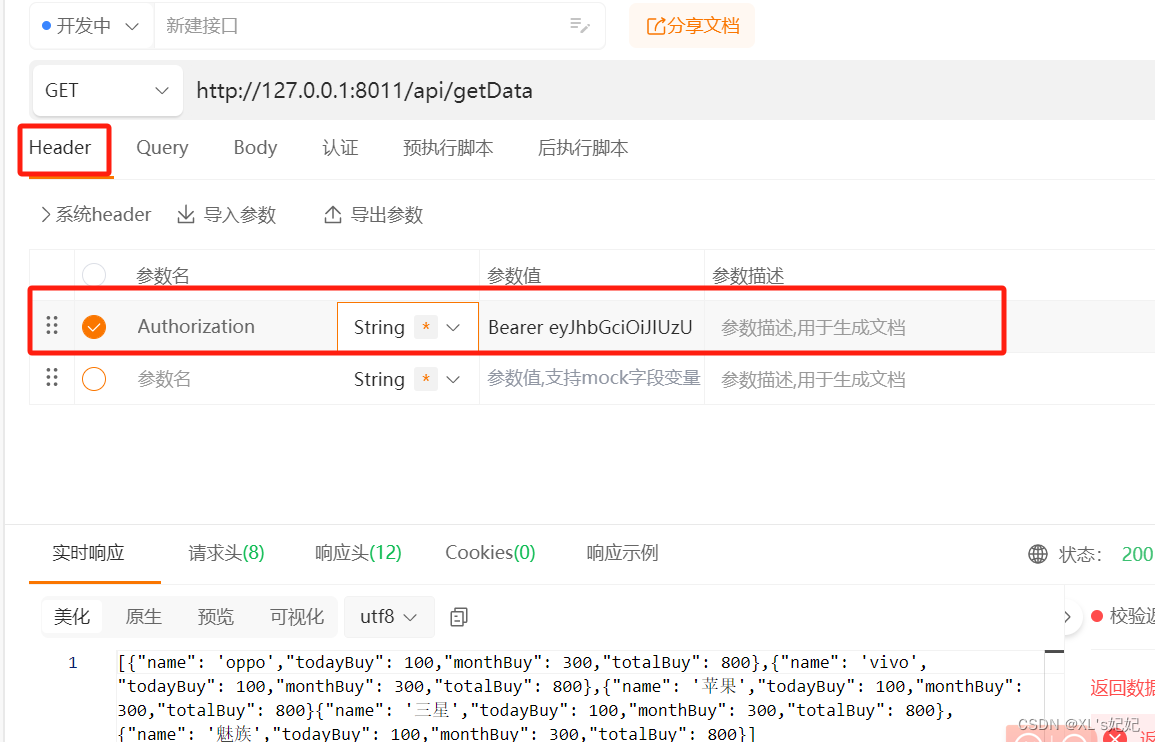
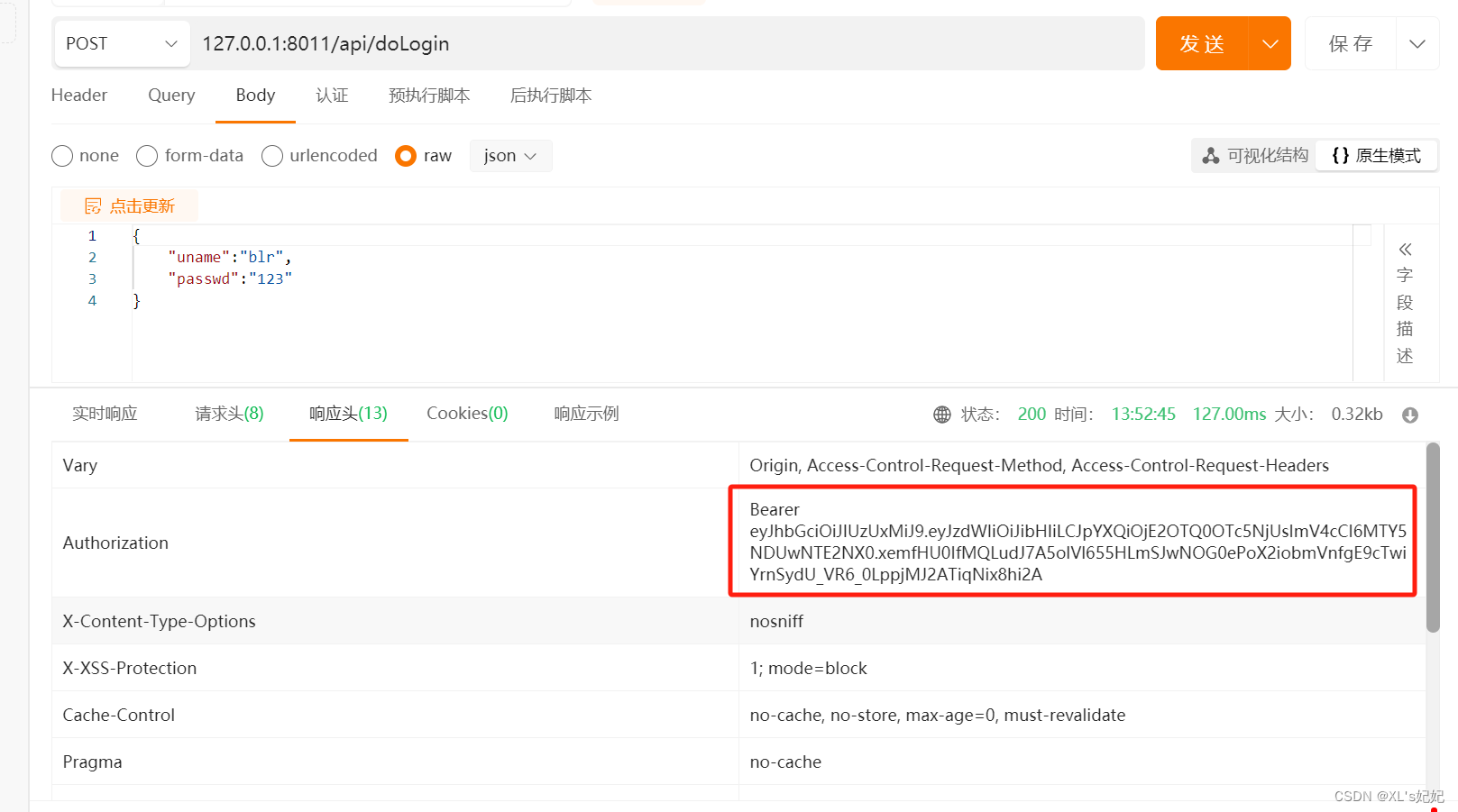
用户登录认证
使用令牌访问受保护资源